My visitors are getting an empty (0 byte) file when they download. How can I fix this?

My visitors are getting an empty (0 byte) file when they download. How can I fix this?

If you have a Goal that links to a protected download, Before & After will hide the real URL of your file. That way if a visitor shares the final URL with a friend, that person will also have to complete your Goal. In order for this to work, you must ensure that your file is publicly accessible. This means that a user who has not entered any kind of password can access the file. When this is not the case, your visitors will often receive a file that has the correct file name but is empty or invalid. You can resolve this by either removing the password protection from the file, or disabling Before & After's URL Masking feature. In order to disable the URL Masking feature, simply visit the Before & After » Settings menu in your WordPress admin area, and then click on the Protected Downloads tab. Uncheck the box for "Mask Real File URL", and click Save Changes. Your visitors will now be linked directly to the file.
When I Input My API Key and Email, My Plugin Still Says it Isn’t Registered!

When I Input My API Key and Email, My Plugin Still Says it Isn’t Registered!

Sometimes, when a user tries to register their plugin, they aren't able to. This can happen for a few different reasons:
  • Your API Key is entered incorrectly: sometimes, a user will remove the prefix from their key. For example, if your key is loc_pro_aae5efbd02 then you need to use the whole key; don't remove the part that says loc_pro_
  • Your Email Address is entered incorrectly: our registration fields are case-sensitive! Often, a user will enter an e-mail address one way when paying and another way when registering. You need to be sure the e-mail address is an exact match, including uppercase and lowercase characters, otherwise registration will fail.
  • You've entered the incorrect e-mail address: sometimes, a user will use a different e-mail address during payment than they use on the site (such as using their own e-mail address when buying a plugin for a client.) For registration to be successful, you have to use the same Email address that you used during purchase.

How can I reset my Goals so that I see the Before content again?

How can I reset my Goals so that I see the Before content again?

If you are logged in to WordPress as an administrator, visit the Before & After > Settings menu, then click on the Reset Goals tab. On this page you'll find a blue button on that page that says "Reset Goals to Before State" - click it to reset all of the Goals to their Before state. This will only effect you, not your users. If you are not logged in to WordPress, simply clear your cookies via your browser's settings.

How can I display a Goal on my website?

How can I display a Goal on my website?

Goals can be placed anywhere on your website, including inside pages, in menus, and in sidebars. To make it easy for you to insert your Goals into any context, we provide a variety of ways to render a Goal:
  1. Click the Before & After Button on any Page or Post, and choose Add Goal
  2. Paste the [goal] shortcode into any page or post
  3. Add the Goal to any menu using the Appearance > Menus screen
  4. Add the Goal widget to any sidebar or widgetized area
  5. Create a direct link to the Goal
  6. Output the goal in your theme using WordPress' do_shortcode function
For more detailed instructions on each of these methods, including screenshots, please see this article: How To Display A Goal On Your Website If you have a place you'd like to display a Goal that's not covered on this list, please get in touch and we will be glad to help.

Once my visitors have completed a Goal, will they have to complete my form again?

Once my visitors have completed a Goal, will they have to complete my form again?

No - once your visitors have completed a Goal, e.g, by completing your form, they will not have to do so again. They'll always see the "After" content for your Goal, as long as the cookie lasts in their browser. This is usually around 30 days, but depends on the person. Users can also clear their cookies manually, which would cause them to see the "Before" content of your Goal again.

How can I keep my visitors from viewing my pages until they have completed a Goal?

How can I keep my visitors from viewing my pages until they have completed a Goal?

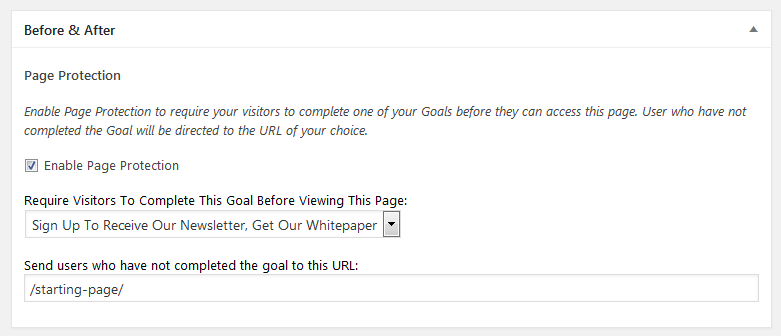
In many cases, you'll want to protect one of your pages with a goal. For example, if you want to keep your visitors from sharing the "Thank You" page of your lead capture form with their co-workers. This is very easy to prevent with Before & After Pro: simply edit the Page or Post you'd like to protect, and scroll down to find the Before & After Meta Box (if you don't see it, try visiting the Screen Options tab to make sure its being shown). Here is the meta box: screenshot-page-protection-meta-box Select one of your Goals that the user must complete to see this page from the drop-down menu, and be sure to provide and URL where you'd like to direct users who have not completed the goal. Don't forget to check the "Enable Page Protection" check box to make the feature active. More Information: How To Setup Page Protection

Every Plugin Comes With Years of Experience

The team behind Gold Plugins has been making WordPress websites for over a decade. Our plugins deliver state-of-the-art features at a fraction of the cost of hiring a freelance developer. By serving thousands of customers, we are able to provide plugins which have undergone years of professional development for less than the cost of hiring a developer for a single afternoon.

Most importantly, because we use your feedback to improve our plugins, we are able to a level of customer support not found with most WordPress plugins or on large marketplace websites. With Gold Plugins, you're not just buying a plugin - you're also getting a team of WordPress experts ready to help solve your problem.

Read More about what makes our company different.